For lodges, hotels & guesthouses
Fill your rooms with online bookings.
Travellers who book a bus on ZamTicket also need a bed. Put your property in front of them with photos, rooms and rates, take paid reservations online, and manage everything from your dashboard.
Free to list · self-serve setup · publish when your listing is complete
What you get
A listing, a booking channel and a back office
Everything below is live for properties on ZamTicket today.
A listing guests trust
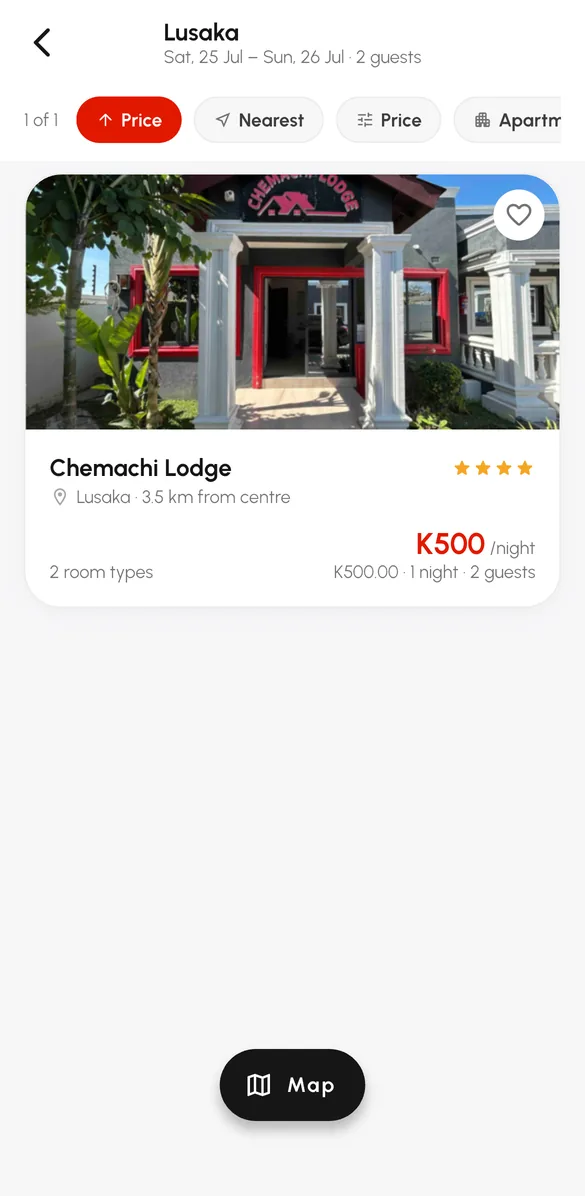
Photos, description, amenities, star class, map location and per-room rates — shown in the app, on the website and on your city's stays page.
Paid online reservations
Guests choose dates and a room type and pay by mobile money. You see the reservation the moment it is confirmed.
Your property dashboard
Upcoming stays, guest details, check-in and no-show actions, room availability and your cancellation policy.
Walk-ins too
Record front-desk bookings in the same dashboard so online and walk-in guests never compete for a room.
Guest receipts
Guests receive a branded booking confirmation and receipt by email for every online stay.
Wallet and payouts
Online earnings are credited to a ledger-backed property wallet with a statement; request payouts to mobile money.
How listing works
Set up in one sitting — progress is saved as you go
- 1
Your business
Company name and a contact person. Takes a minute.
- 2
Your account
Create your manager account with email and password, or continue with Google.
- 3
Property and rooms
Address, photos, amenities, then each room type with its rate and how many you have.
- 4
Go live
A readiness check shows anything missing. Publish, and your rooms are bookable.
Questions
Before you list
Who can list a property?
Lodges, hotels, guesthouses and serviced apartments in Zambia. You create the listing yourself — business details, property, rooms and photos — and publish when it is complete.
Does it cost anything to list?
No. Listing is free. When a guest books and pays online, you receive the room rate; the guest pays a small service fee at checkout.
How do guests pay?
Online with MTN Mobile Money or Airtel Money when they reserve. The reservation is confirmed once the payment is confirmed.
How do I see and manage bookings?
In your property dashboard: upcoming reservations, guest details, check-in and no-show actions, walk-in bookings and your earnings statement.
How do I get paid?
Online earnings are credited to your property wallet with a statement of every booking. You request payouts to your mobile-money account from the dashboard.
Need a hand with your listing?
Our team helps property managers get set up — contact us and we will walk through it with you.
- No listing fee
- You control rates, availability and your cancellation policy
- Unpublish any time from the dashboard